How to make the most of modes in the GUARDING ASSET profile
MALA GPS tracker for guarding assets
Mala is not just a GPS tracker.
It is a guardian of everything that has is of value to you.
From firewood to a motorcycle, car or caravan. Beehives, construction equipment or garden tools. If something can be stolen, tipped over, moved or lost – Mala will be the first to let you know about this.
How Mala GPS tracker works when guarding assets
Movement and tilt detection:
The tracker monitors vibrations and angle changes. When movement or tilting is detected (for example a shipment tipping over more than 30°), it triggers an alarm and sends notification of this to the app.
Geofence:
You can set a geofence (for example a construction site, parking area, warehouse, or marina). When the asset leaves or enters the geofence zone, you will receive notification of this.
Route recording:
In modes with active tracking, the route (of movements) is recorded automatically. Positions are captured at short intervals and sent to the app according to the selected mode. Route/trip history can be stored for up to 365 days.
Guarding and power-saving mode:
If the monitored asset is stationary, the tracker is guarded and switches to power-saving operation. It checks for mode change requests every 4 hours. It can be woken instantly by shaking it or by placing it on the recharging mat.
Operating modes of Mala GPS tracker – Guarding assets
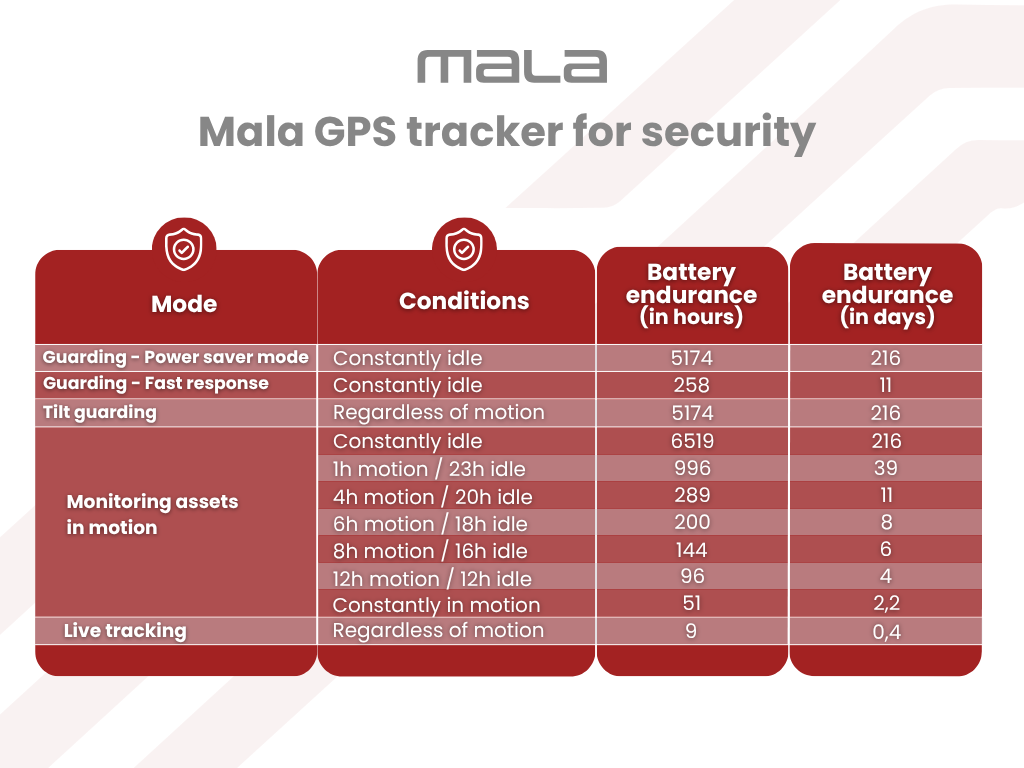
Response speed and battery endurance are influenced by the mode chosen.
Guarding asset – power saver mode
Assets remaining in one place for long periods of time – wood, beehives, caravans, boats, garden equipment, stored machinery.
- When vibrations are detected, an alarm notification arrives within 1 minute
- The alarm lasts 1 minute
- During the alarm, positions are captured and sent every 10 seconds
- After the alarm, if movement continues, positions are sent once a minute
- After movement ends, the tracker is set back to guarding and goes to power-saving operation.
- The tracker checks for mode change requests every 4 hours
- It is possible to change mode immediately by shaking the tracker or by placing it on the recharging mat
Battery endurance - model situation:
Up to 216 days when idle/stationary.
Guarding asset – fast response

On cars, motorcycles, trailers, vans, construction equipment – assets at a higher risk of theft.
- When vibrations are detected, an alarm notification arrives immediately
- The alarm lasts for 1 minute
- During the alarm, positions are captured and sent every 10 seconds
- After the alarm, if movement continues, positions are sent once a minute
- The tracker is constantly online
- The mode can be changed at anytime
- This mode is more demanding on battery consumption
Battery endurance - model situation:
Up to 11 days when idle/stationary.
Tilt monitoring

In suitcases, for shipments, on crates, on goods sensitive to tipping.
- When the angle changes by more than 30°, an alarm notification arrives within 1 minute
- The alarm lasts for 1 minute
- During the alarm, positions are sent every 10 seconds
- After the alarm, if movement continues, positions are sent once a minute
- After movement ends, the tracker is set back to guarding and goes ino power-saving operation.
- The tracker checks for mode change requests every 4 hours
Battery endurance - model situation:
Up to 216 days when idle/stationary.
Monitoring assets in motion

In suitcases, for shipments, transport services and long-distance transport.
- Automatic route recording throughout movement
- Positions captured every 10 seconds
- Positions sent to the app once every minute
- Goes back to power-saving operation after movement ends
- The tracker checks for mode change requests every 4 hours
- This mode is more demanding on battery consumption
Battery endurance - model situations:
1 hour daily → up to 39 days
4 hours daily → up to 11 days
12 hours daily → up to 4 days
Live tracking
In emergency situations – theft, towing away of vehicles, need for immediate searching.
- Position generated every 5 seconds
- Position immediately sent to the app
- The tracker remains constantly active
- This mode is extremely demanding on battery consumption
Battery endurance:
Maximum 9 hours
Power off

situations where you do not plan to use the tracker for a longer period of time and want to turn off the device completely.
Warning: It is not recommended to turn off a tracker that you do not physically have with you. If you do not have the tracker with you, it will not be possible to turn it on again if it is needed.
-
After sending the request from the app, the tracker remains active for another 10 minutes.
-
During this time, the mode can be changed.
-
After 10 minutes, the device turns off completely.
-
Turning it back on is only possible by physically placing it on the recharging mat.
Mala GPS tracker battery endurance table
Overview of battery endurance for different usage scenarios. Actual battery endurance may vary depending on movement intensity, signal strength, and the selected mode.